

ShowRunner · Free sound cue player for Mac and Windows
ShowRunner Plays Your Show's Sound Cues, Free
ShowRunner is a free sound cue player for community and school theatre, dance recitals and live events. Drop your audio in, set your levels, and press the space bar to fire each cue. It runs offline on a Mac or Windows PC.
Download for Mac Download for Windows
Version 1.0.0, released November 17, 2026. Mac: macOS 13 or newer, Apple Silicon and Intel. Windows: Windows 10 or 11, 64-bit. Needs Google Chrome or Microsoft Edge.
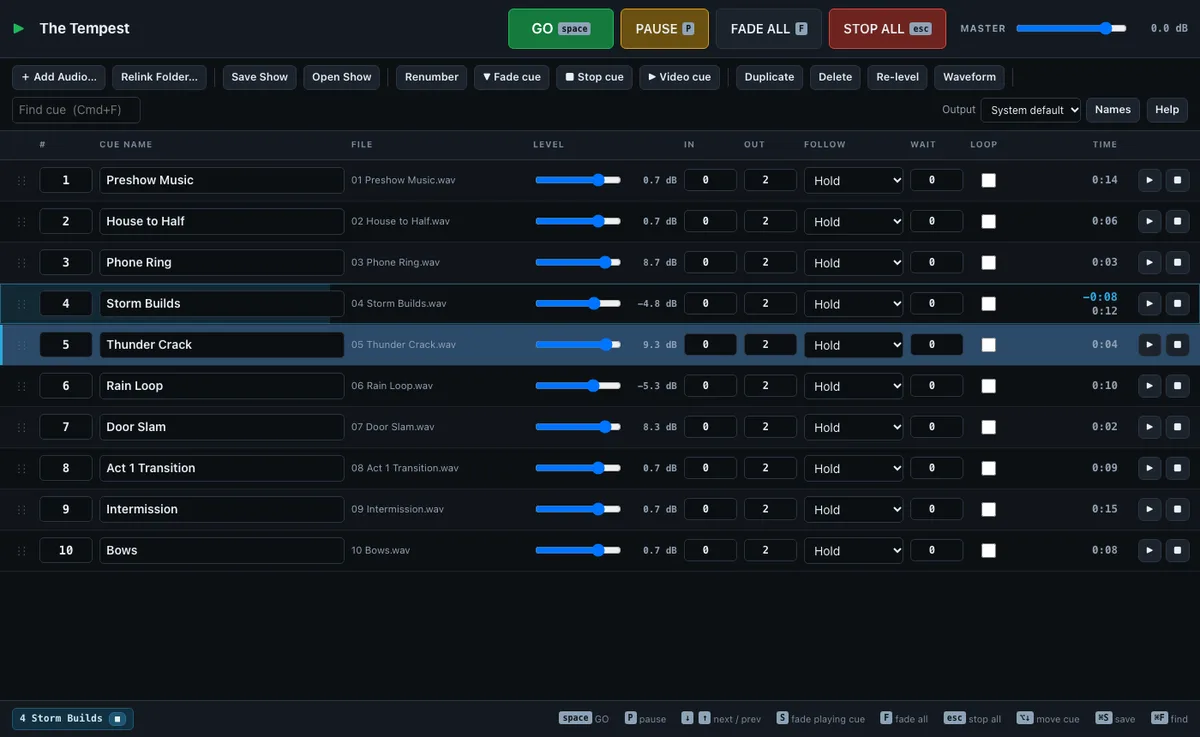
How Does ShowRunner Work?
Every audio file you drop in becomes a cue, numbered in order and levelled so its loudest peak sits at -3 dB. Press space to fire the next cue.
- Build the show. Drag your audio files or a whole folder onto the window. Rename and renumber cues, and drag them into order.
- Set each cue. Level, fade in, fade out, loop, and whether it holds or follows the cue before it. The waveform editor sets where each cue starts and ends.
- Run the show. Space is GO, P pauses everything, F fades everything and Esc stops everything at once.
Fade and Stop cues act on another cue, so a storm can fade out on the next GO. Video cues trigger scenes in MadMapper. Save the show file next to your audio, and the whole folder moves to another computer in one drop. A User Guide is built in.
Questions
Is ShowRunner free?
Yes. ShowRunner is free to download and use, on as many computers as you like. There's no trial, account or license key.
What does ShowRunner do?
It plays sound cues for a live show. Drop your audio in, set each cue's level, fade in and out, and press the space bar to fire the next cue. Fade and Stop cues act on other cues, cues can follow each other automatically, and a waveform editor sets start and end points. Video cues trigger scenes in MadMapper.
Does it work offline?
Yes. Your shows and audio stay on your computer. When it's online, the app checks ethanentermedia.net once a day for a newer version. That check sends nothing about your shows.
Why does it open in Chrome or Edge?
ShowRunner runs in Google Chrome or Microsoft Edge because they can save your show back to its file and send sound to a chosen output. It opens there even if Safari or Firefox is your usual browser. Install one of the two before your first show.
Will my computer show a warning when I open it?
On a Mac, macOS asks once to confirm you want to open an app downloaded from the internet. Click Open. The Mac app is signed and notarized by Apple. The Windows version isn't signed yet, so the first time Windows may say "Windows protected your PC". Click More info, then Run anyway.
How do I move a show to another computer?
Keep the show file and its Audio folder in one folder. Copy that folder to the other computer, open ShowRunner and drag the folder onto the window. The cue list and all its audio load in one drop.
What if I need a prompt book, lighting cues or the crew on their phones?
That's Cue Sheet, my show control app. It runs sound, lighting and video cues and the prompt book from one computer, with the crew following on their phones.
Who Makes ShowRunner?
I'm Ethan Fuhrmeister, and I make ShowRunner at Ethan Entermedia, LLC in Winston-Salem, NC. I've worked in theatre tech since I was 6 and designed or programmed lighting for more than 40 productions. I built ShowRunner to run sound for my own shows. See my theatre lighting design work.
Need a prompt book, lighting cues or the crew on their phones? That's Cue Sheet.
Questions or support: info@ethanentermedia.com. ShowRunner Terms of Use · ShowRunner Privacy Policy